This article contains the release notes for the Akixi application.
Release 3.5.4
Interface Changes
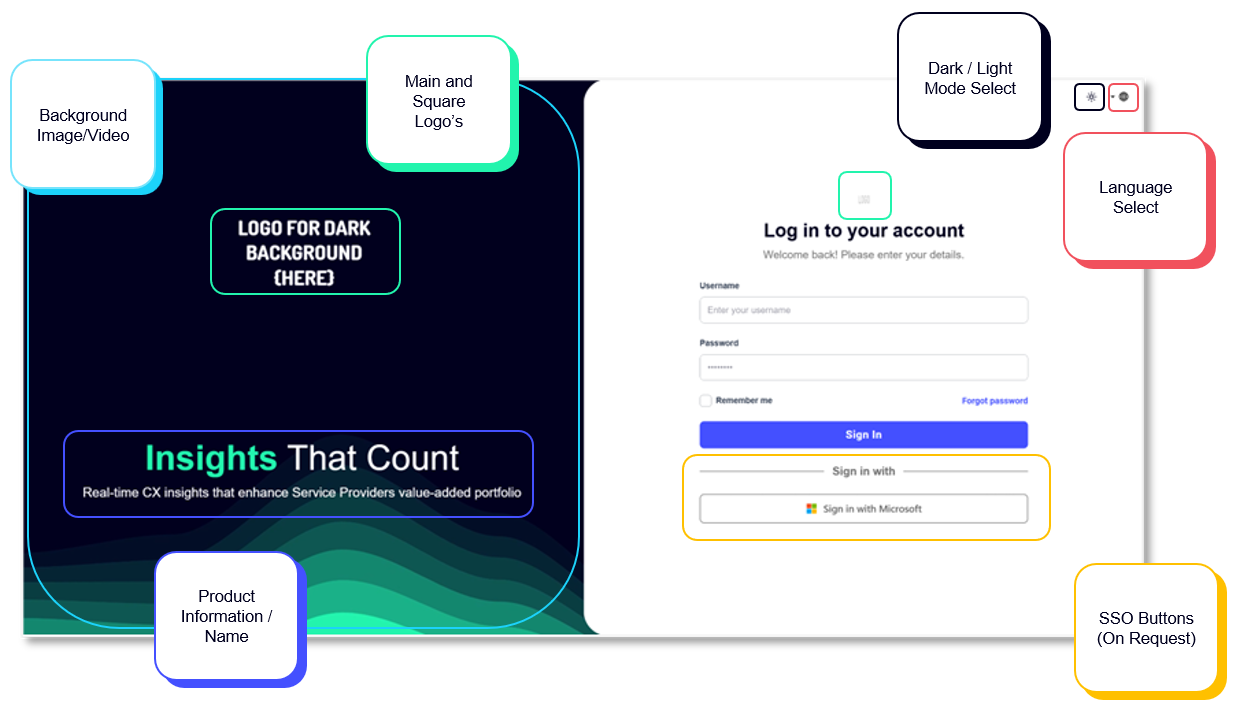
Authorisation Screen
The new Authorisation Page replaces the previous Welcome/Login screen, delivering a cleaner and more modern user experience.
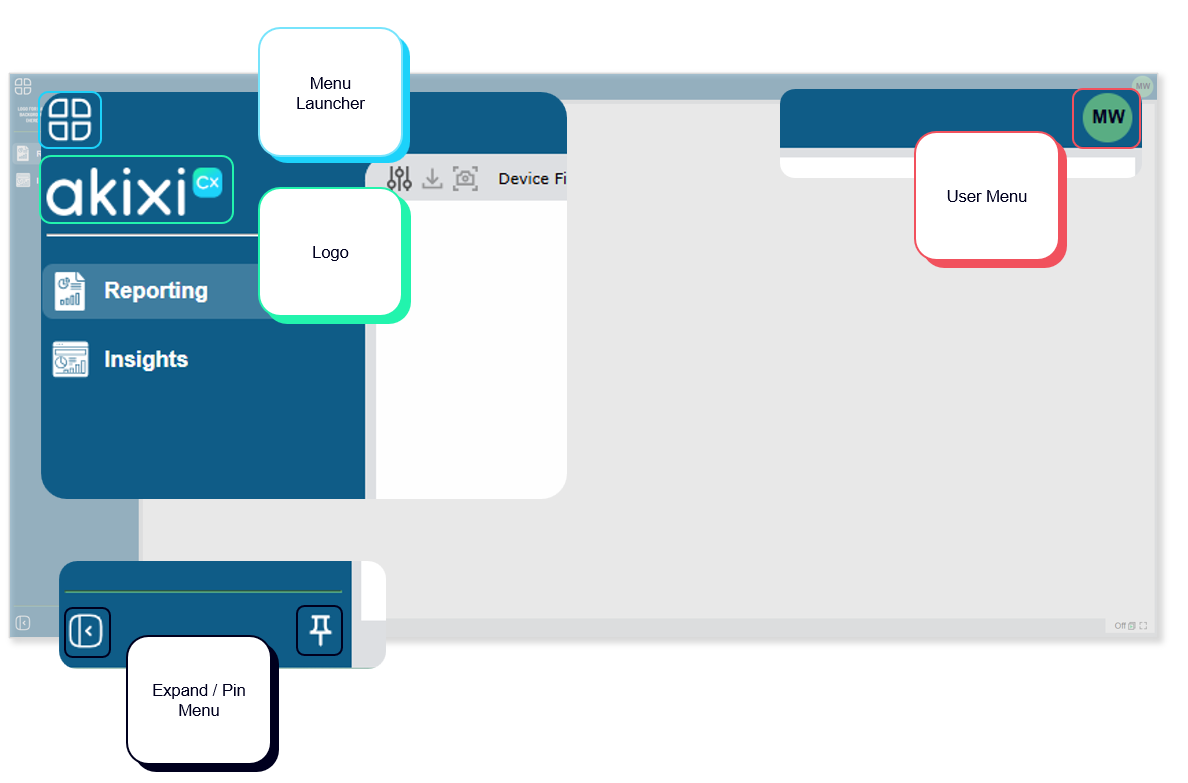
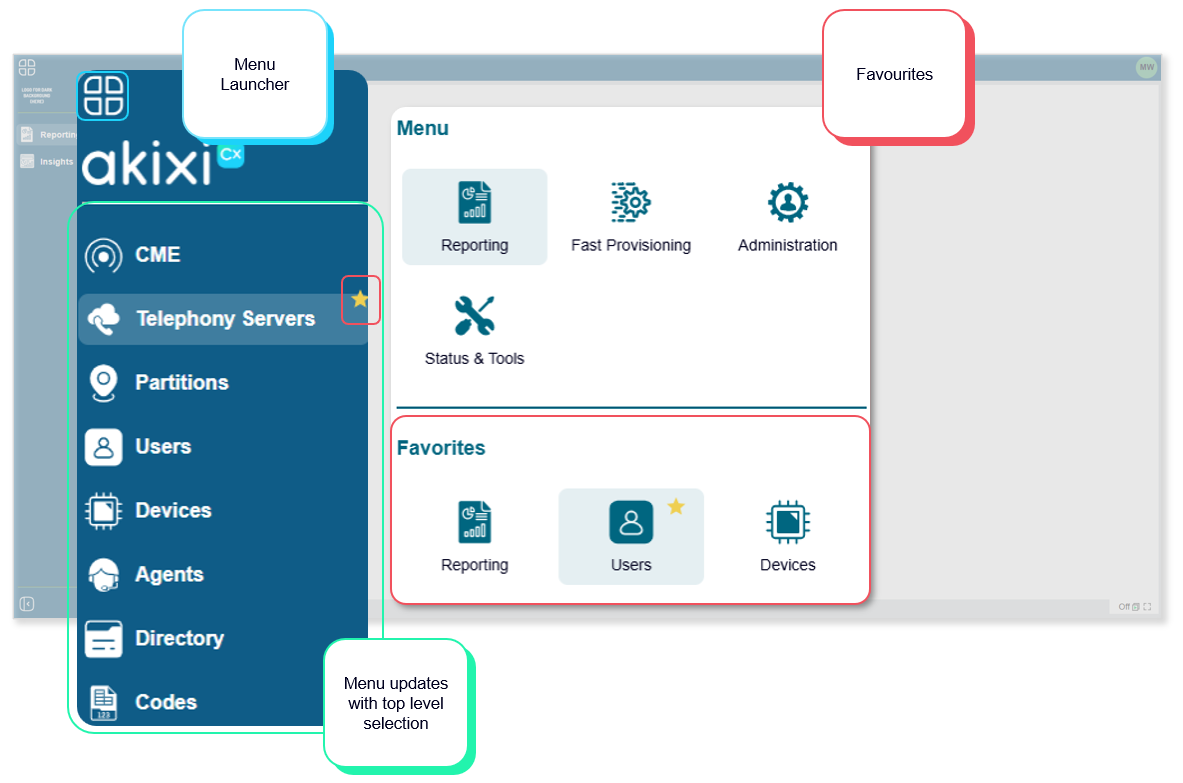
Menu/Navigation
The updated Menu and Navigation provide a more intuitive and streamlined user experience, making it easier to access key features and move through the platform. With a cleaner layout and improved structure, users can navigate more efficiently while benefiting from a modern, consistent design.
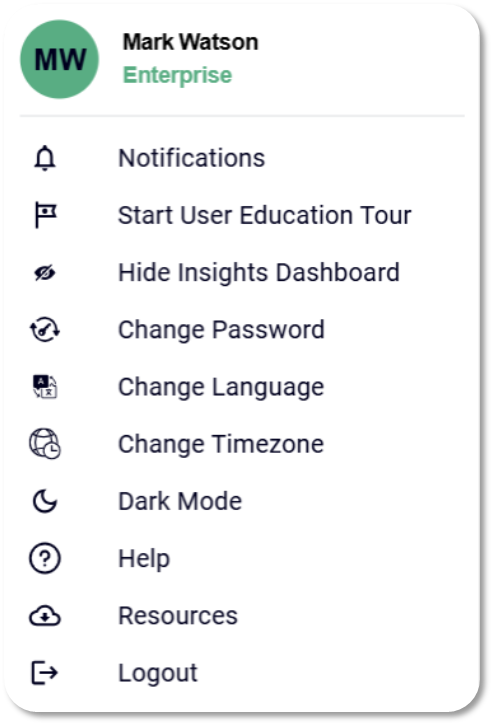
User Menu
The User Menu is now accessed via the avatar in the top-right corner, providing a more familiar and streamlined entry point for account-related actions. It consolidates key settings and tools—such as notifications and preferences, into a single, easy-to-access menu, improving usability while maintaining a clean and modern interface.
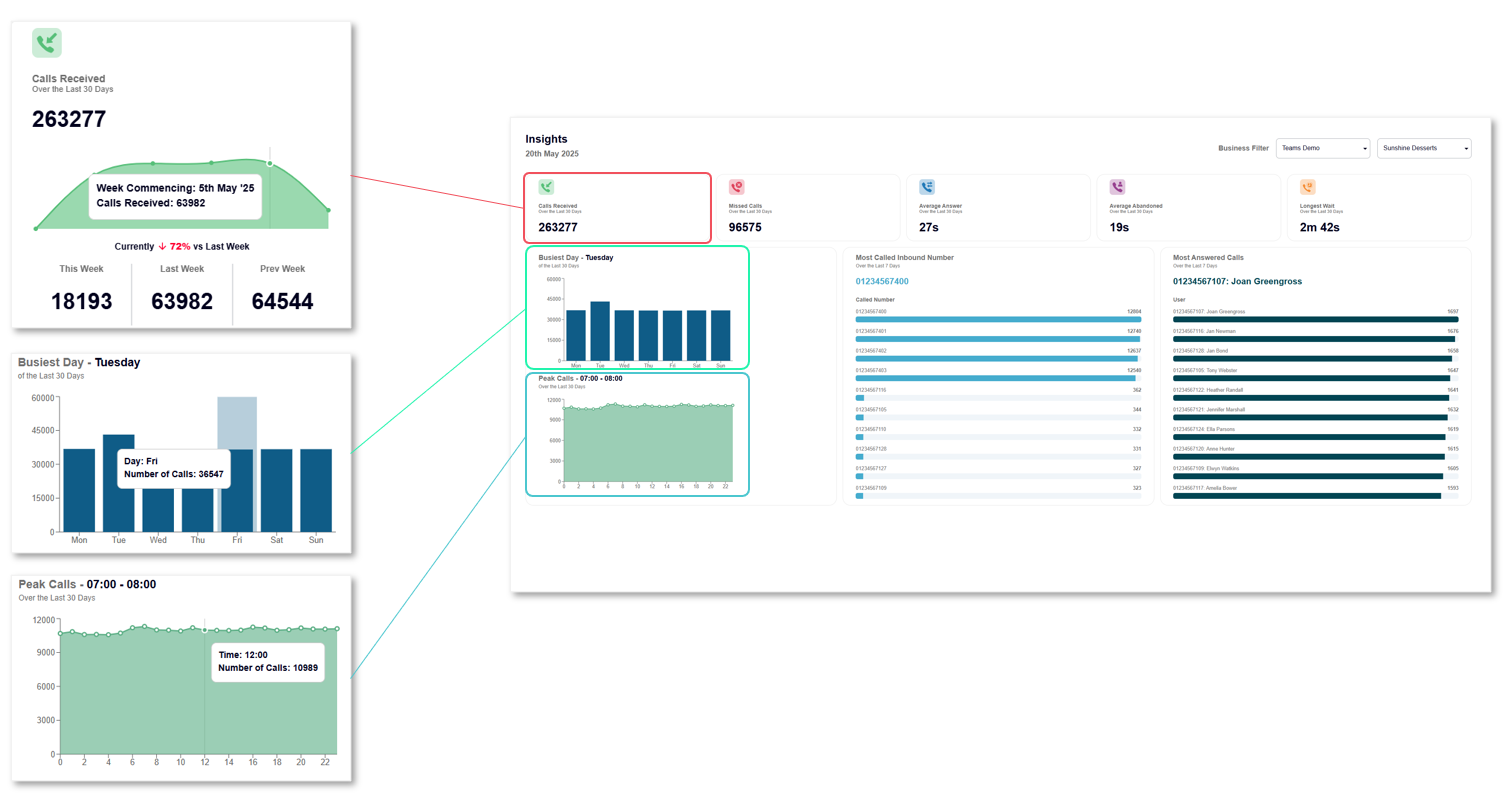
New Insights Dashboard
The updated Insights Dashboard delivers a clearer and more structured view of key data, making it easier to monitor performance and identify trends at a glance. With an improved layout and modern design, users can quickly access the information that matters most and gain actionable insights more efficiently.
- New Insights Dashboard
- More Statistics
- Drill Down into High Level Numbers
- Interactive Graphs
- Brandable
- Inbound Call Data
- Last 30 Days
- Drilldown in Week Vs Week (only 30 days of data shown)
- Performance indicator Vs Last Week
- Busiest Times
- Last 30 Days
- Interactive Graphs
- Inbound Analysis
- Last 7 Days
New Help Section
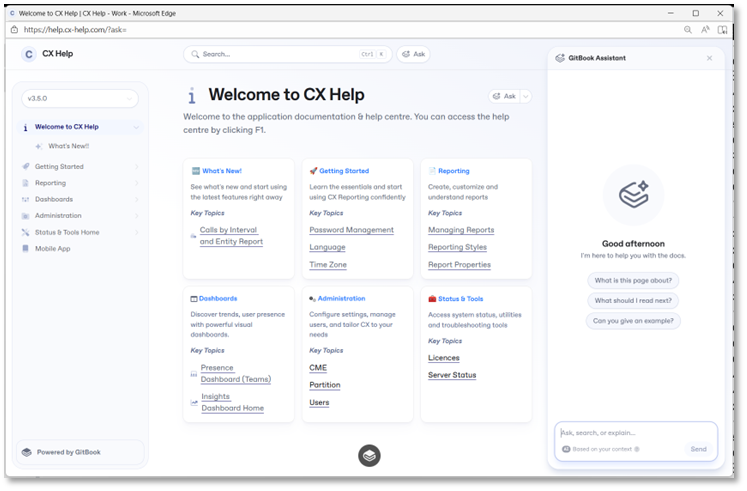
New CX Help – Powered by GitBook
- Replaces old F1 help which is no longer updated from 3.5.0
- Updates no longer linked to Core App upgrades
- AI Assistant built-in 🤖
- Can only be accessed once logged into CX Platform.
Analytics (New Metrics)
Call outcome & abandonment metrics
- Inbound Unique Abandoned – count of unique inbound calls later abandoned by the caller.
- Average Attempts Before Answer – average number of times a customer calls before getting through.
- Abandoned Calls Before/After Entrance Message (BroadWorks only) – four new metrics tracking calls (and %) abandoned during vs. after an entrance/queue message, plus a Yes/No flag on the Historic Call Log.
- Bounced Call Metric – cumulative count of call "bounces" on the Historic Call Log.
- Call Center Escape Metric – separate "Escaped From/To" metrics for calls that exit a queue via key press (still counted in overflow too); available on wallboards, Queue Report, and Historic Call Log, with filtering by start/end reason.
Timing/duration metrics
- Time Started At (Entry) – call start time field, addable to Historic Call Log, Active Calls, Unreturned Lost Calls, and Call Detail modals.
- Total Longest Call Waiting Now – can now be added to wallboards, showing full customer wait time across segments/queues including overflow.
- Max Available Agents / Max Signed In – peak agents available or signed in during a period; available on interval and Hunt Group/Queue reports.
- Average Staffed Time – total on-duty time divided by agents signed in for the period.
- Call Held/Talk/Time/Ring Time (All Segments) – four new "all segments" duration metrics (aggregating across every leg of a call), added across Historic Call Log, Active Calls, Call Detail Modal, and (for Call Time/Ring Time) Unreturned Lost Calls.
- Wrap Up Time Per Call – new Historic Call Log metric.
Call classification
- ACD vs Non-ACD vs Internal Calls – a major new categorization splitting inbound calls into ACD (queue-routed), Non-ACD (non-ACD groups/basic queues/direct-to-extension), and Internal (extension-to-extension), each with its own set of call count, percentage, and duration sub-metrics (answered, abandoned, talk/wait/ring time, etc.).
- Call Terminated By? (BroadWorks only) – shows whether the calling or called party ended an answered call.
- Call Queue Policies (BroadWorks only) – five new metrics covering calls in overflow, forced forwarding, night service, holiday service, and queued calls, plus "Policy Applied" fields on the Historic Call Log.
- Transfer From Supervisor – new "Supervisor Transfer" call result/end-reason, distinguishing supervisor-initiated transfers from forwards/overflows.
- N/A Code Counts – added to agent-level reporting, showing how often agents use each "Not Available" reason code (including an "Other" bucket), available historically and in real time.
Call-back / returned-call metrics
- Successful / Unsuccessful / Attempted Returned Abandoned Calls – new metrics tracking BroadWorks call-back flows (answered, failed, and total attempts), aimed particularly at healthcare/high-demand SLA reporting.
General Features
Dashboard & UI options
- Option to Hide Insights Dashboard – users can toggle the new Insights Dashboard off and revert to the previous experience via the avatar menu (top right).
Auto Attendant support
- Auto Attendant Reporting – new "Auto Attendant" device type; calls into an AA that route elsewhere are logged as "Overflowed Off," and calls that hang up are logged as "Abandoned."
- New Device Type Filtering – the Extension/Device Report can now be filtered by device type: Any, Auto Attendants, Extensions, or Voicemail Apps.
Agent usability
- Agent Shortcut Keys (BroadWorks) – agents with the reporting portal open can press Ctrl+Shift+A to go available or Ctrl+Shift+U to go unavailable.
- New Alarm Sounds – additional field alarm sound options with real-time reporting for better situational awareness.
Report management
- Re-applying Default Reports/Sets – a new "Add Default Report" button lets users re-download an entire default report set or a single report from the repository; re-added reports are labeled "(New)," old ones can be overwritten or kept, and dashboard sub-reports auto-populate into a dedicated folder.
- DNIS Report – new "Calls by DNIS" report covering external inbound, internal, and outbound calls associated with DNIS numbers tied to a Call Center.
- Update to Interval Reporting (Total Calls) – "Calls by ½ Hour" renamed/upgraded to "Total Calls By Interval," adding 15-min, 30-min, 1-hour, and 2-hour options (existing reports migrate but keep their 30-min default; users can change interval).
- Update to Interval Reporting – "Calls by Day/Week/Month" upgraded to "Calls By Interval Report," adding 15/30-min and 1/2/4/8/12-hour intervals alongside existing day/week/month options (existing reports migrate, keeping prior interval).
- New Report – Interval and Entity Report – "Calls by Interval and Entity" report generates activity across intervals (15 min up to monthly, plus day-of-week) for Devices, Groups/Queues, Agents, or DNIS. Notes: no real-time or charting support, Column A locked to interval, Column B locked to description, sortable only by interval.
- Update of ECCR Out-of-the-Box Reports – refreshed "Enhanced Call Centre Reports" portfolio; applying/reapplying the set deploys the latest version, with key reports set to open by default, reducing setup effort for new tenants.
Export/scheduling
- Export to XLS – ability to download/export and schedule reports as XLS.
Dashboard Export – export/schedule whole dashboards: XLS puts each report on its own sheet, PDF combines all reports into one file, CSV and RTF each package the individual reports into a zip. - Schedule Emails to Multiple Recipients – reports can now be scheduled to up to 20 recipients (up to 10 can be non-users, provided their email domain matches the reporting user's domain); this is disabled for CME reporting users.
Filtering & search
- New Device/Agent Search Filter – enhanced filters allow selecting multiple devices and/or agents at once when modifying reports.
- Simplified Call Log – improved "first/last for filtered device" segment filtering so it correctly surfaces the call segment where the call actually interacted with the filtered device, rather than just the overall call record.
- Improved Filtering for Unreturned Lost Calls / Call-backs – new filters to isolate specific unreturned call types (e.g., only "escaped" call-back requests), a new "Include outbound calls for specified devices" option to match outbound call-backs to the original missed call (even without assigned users), and a new "Ignore Escaped Calls" setting to exclude call-back segments from inbound SLA calculations.
Timezone & call visualization
- Time Zone Reporting – multi-timezone support at three levels: Telephony Server, Partition, and individual Reporting User/Application User; supports admin-assigned or self-assigned timezones, plus automatic detection/prompting based on browser timezone.
- Call Journey – a new Timeline View (opens automatically from Historic Call Log, Unreturned Lost Calls, Active Call List, or Agent/Extension Report call-control menus) visually maps a call's full journey — start/end times, calling/called parties, ring/talk/hold time per segment, who answered, transfers/routing, and missed-call/overflow routing.
Release 2.8.3.1
Key Features:
Wrap-Up Time Against Historic Calls
Bounced Call Metric
Captcha issue for forgotten password is resolved
New Metrics
Agent High Watermarks
Releasing Party Stat
ACD vs Non ACD Inbound Calls
Full Call Duration Stats
Call Queue Escape Metric
Release 2.7
Automatic Creation of Call Center Supervisors
Service Pack Provisioning for Reporting Users
BKWS Supervisor Permission Sync
Custom Administrator Role Templates
Reapply Default Report/Sets
Webex Calling Integration Subscription
Option to Hide Insights Dashboard