In order to use older Yealink device types on the platform you will need to manually provision them as they are only supported as a Generic SIP Device. This includes devices such as:
T27P Deskphone
T41P Deskphone
T42G Deskphone
T46G Deskphone
T48G Deskphone
W52P DECT bundle
W56P DECT bundle
Provisioning:
- Obtain the handset’s IP address
Press the “OK” button the Yealink to display this - Browse the handset’s IP address to display the web interface
- Login with the admin credentials provided by your provider or if the handset has been factory reset, then they will be:
Username: admin
Password: admin - Browse to the account page
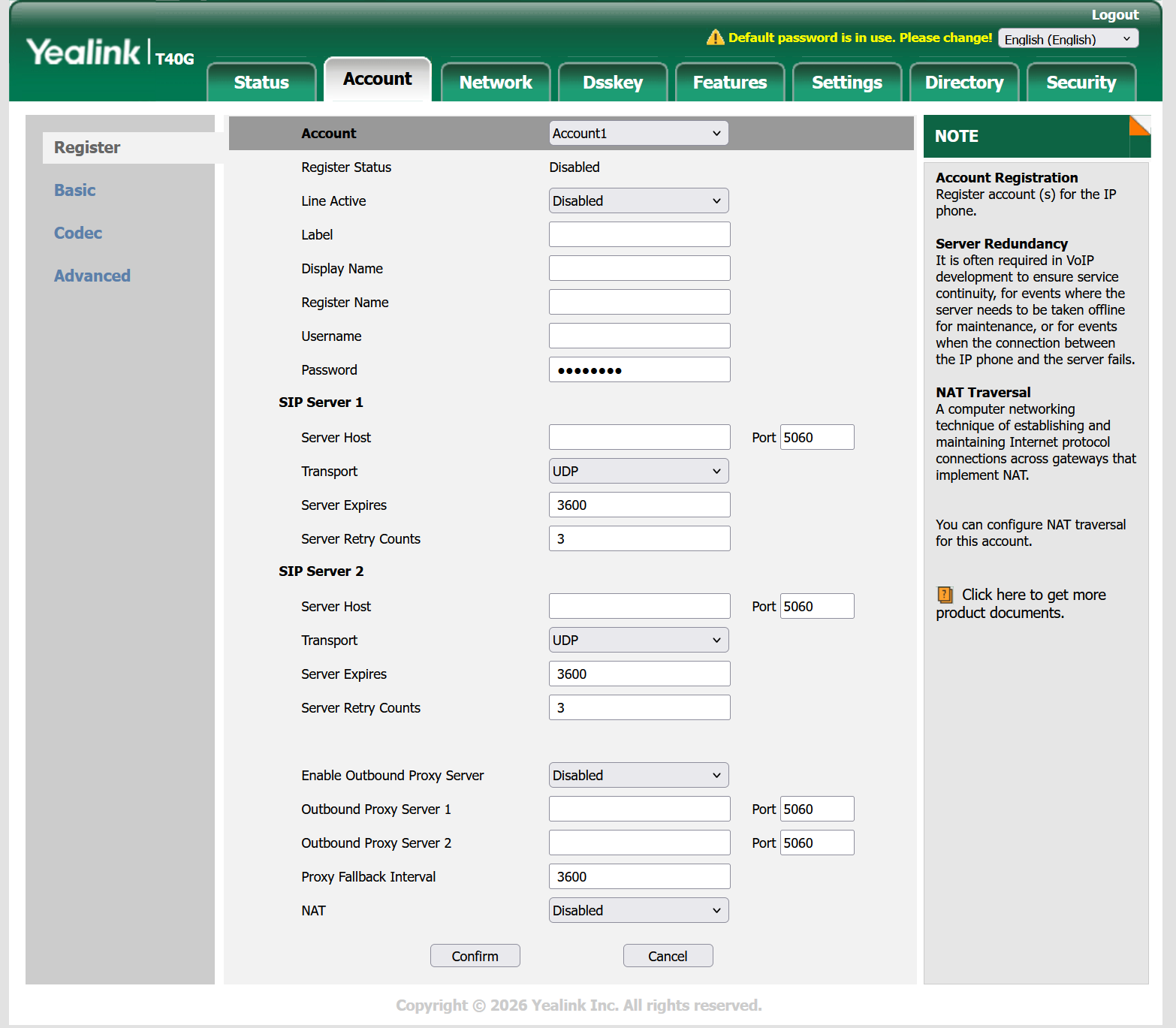
- To get the handset to register the following fields are required to be filled out:
- Line Active: Set this to Enabled
- Register Name: This is the SIP Username
- Username: This is the lineport without the domain on Uboss
- Password: This is the SIP Password on Uboss
- Server Host: sbc.insmartcloud.com
- Enable Outbound Proxy Server: Set this to Enabled
- Outbound Proxy Server 1: sbc.insmartcloud.com
.png)
.png)
- Click “Confirm”
Once complete, the handset will then register.